同一個角色要再出幾種配色變體,顏色要一眼分得出來,整套動作格每一格都要一致。環境是 Unity 加 Python,素材是逐格 PNG 精靈圖。依序試了五種做法,最後定案的是 ControlNet img2img 重上色:先用 Meta 的 SAM 2 部位遮罩換色產出底圖與鎖定遮罩,再交給 ControlNet 補上重畫的質感,最後把斑點、眼睛、效果符號這些鎖定區換回換色結果。
做法 1:Unity Sprite shader 整隻色相偏移
寫一支 UI/Sprite 用的 hue-shift shader,參數是色相偏移加飽和度、亮度微調,可以和既有的著色效果疊用。兩種變體分別偏紅紫與青藍,先用 PIL 照 shader 公式算離線預覽。
實機上幾個角色在深、淺底與遊戲畫面底都一眼分得出來,描邊和亮面沒有走樣。但比較過幾種變色做法後,改走遮罩換色加漸層對應,再加一個小標記,整隻調色相就不用了。
做法 2:色塊自動遮罩加 gradient map
用腳本依色相加飽和度門檻自動抓遮罩,全部角色共 59 格,不用 AI 重畫。遮罩掛成 Secondary Texture,shader 在遮罩區取原像素明暗,再去查配色漸層;沒有遮罩的種類就不換色。遮罩檢查 0 問題,預覽用 numpy 照 shader 重算。
預覽結果太粗糙,放棄這條路線。
做法 3:gpt-image 整張重畫
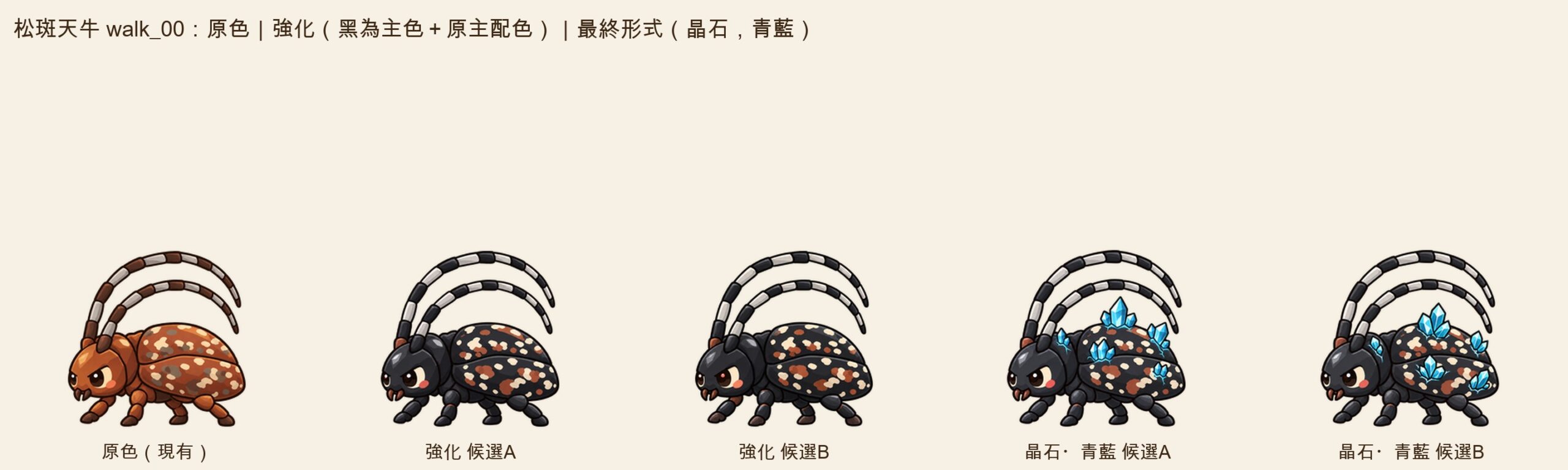
用的是 gpt-image-2.5-flare,quality xhigh。拿原圖當參考圖整張生成,生成時就是透明底,不准遮罩、局部修補或事後去背。先出黑色版和背上長晶石的版本當候選,第二輪再把晶石版往更華麗的方向出 4 個方向。
黑色版 4 次、晶石青藍 3 次、紫 2 次,共 9 次全部可用;外框差 ≤3px、腳底貼地。黑色版通過,晶石版被認為不夠華麗,第二輪再出四個方向共 10 次。每次約 30 秒。
品質最好,黑色版(以下稱基準 A)成為比較基準。問題在量:每格都得對齊重生,估算全部角色 57 格 × 2=114 張成品,約 180 次生成。晶石這種要長出新東西的版本,只能靠重畫。
做法 4:Meta SAM 2 部位遮罩,保留明暗換色
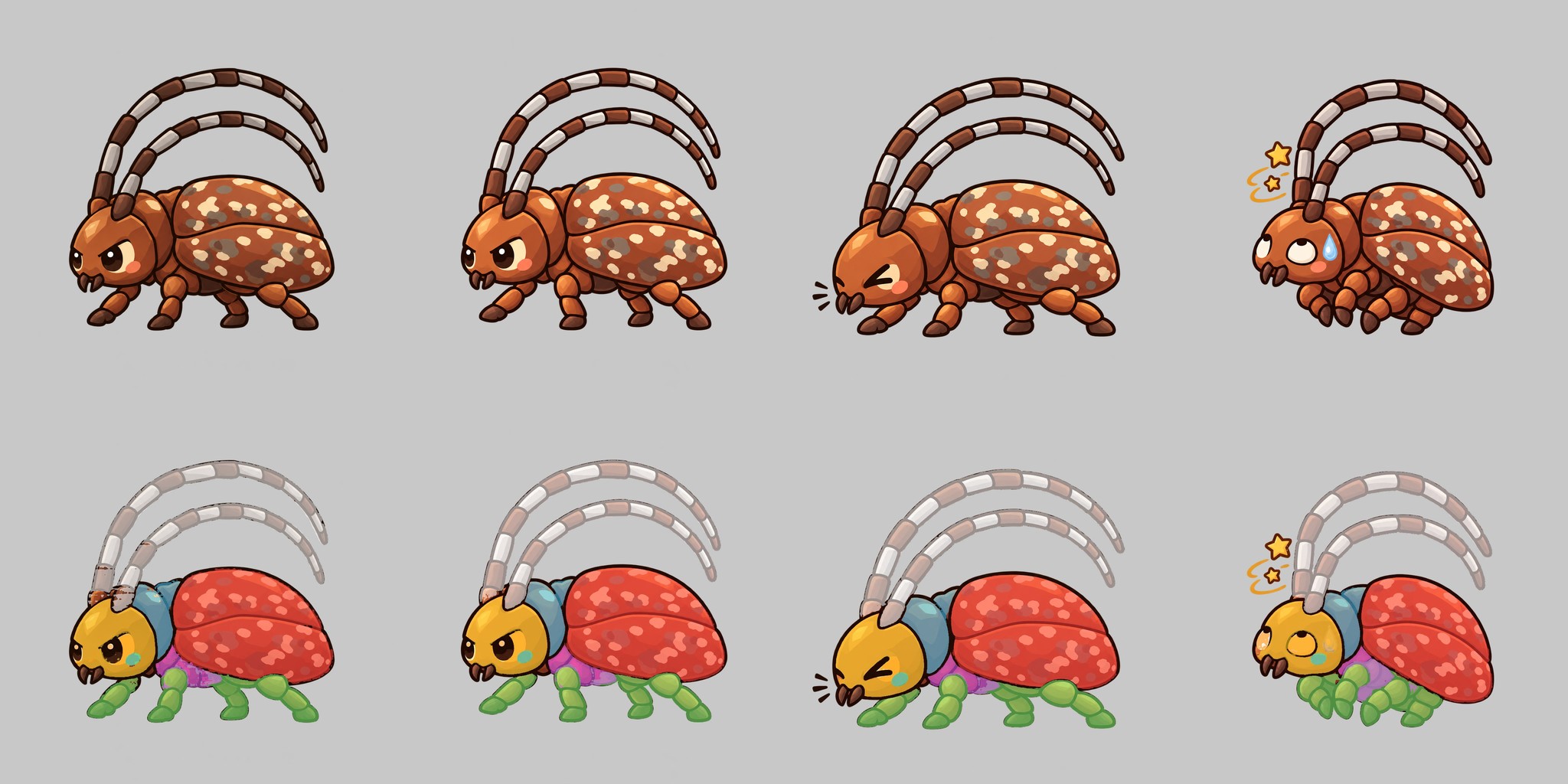
裝 sam2.1 small/tiny(torch、mps),只在第 1 格點選 7 個部位,並把眼睛、腮紅設成保護區。用影片追蹤把遮罩傳到其餘 7 格,再在保留明暗的前提下換色。
追蹤非常穩:0 格要補點,遮罩邊界貼著描邊,遊戲格的剪影和現有格逐像素一致,連播不會抖。追蹤 8 格約 12–16 秒(每格約 2 秒),換色每格約 0.4 秒,人工點選加調換色參數約 1 小時(下一個角色約 10–20 分鐘),不花錢。
缺點出在「只靠顏色分辨部位」:翅鞘暗部陰影和灰褐斑分不開,下緣會被染出一塊塊紅褐。黑色是把原圖壓暗得來的,少了亮面黑的立體感,原寸看得出來比較髒。
做法 5:雲端 GPU 上的 ControlNet 線稿鎖形重上色
在雲端臨時開一台 L4 等級的 GPU。用 lineart_anime 線稿加原圖深色描邊,透過 ControlNet Union promax 0.9 鎖住形狀,IP-Adapter 拿基準 A 當風格參考,走 txt2img、固定 seed,最後套回原 alpha。img2img 會殘留褐色,已淘汰。
8 格 × 3 組沒有一格崩壞,跨格彩度標準差 1.1,三條路裡最像基準 A。花了約 0.9 小時、約 1.1 美元,每格約 17–18 秒。
問題是細節略糊;星星和汗滴被染成紅黑;換 seed 時閉眼會被畫成紅色怒眼;斑點每格重新長,不照原圖位置。
並排比較
表中「SAM 2 壓暗換色」是做法 4 的試做版,「SAM 2 部位遮罩+點色換色」是改成點色換色後的版本,最後一列是把兩條路混合的定案版;各欄照實測記錄,gpt-image 的花費材料未寫。
| 做法 | 品質 | 一致性 | 時間 | 花費 |
|---|---|---|---|---|
| gpt-image 整張重畫 | 最好,當作比較基準(基準 A) | 要逐格對齊,外框差 ≤3px | 每次約 30 秒 | 材料未寫 |
| SAM 2 壓暗換色(試做) | 陰影會被染錯,原寸看得出來比較髒 | 剪影逐像素一致 | 追蹤 8 格約 12–16 秒 | 不花錢 |
| ControlNet 線稿重上色 | 最像基準 A,但細節略糊 | 跨格彩度標準差 1.1 | 每格約 17–18 秒 | 約 1.1 美元 |
| SAM 2 部位遮罩+點色換色 | 邊界最乾淨(描邊、眼睛、星星汗滴不動),但沒有重畫的質感 | 彩度標準差 0.37 vs CN 0.51 | 本機 8 格追蹤 18 秒、換色每格 1.6 秒 | 0 美元 |
| ControlNet img2img 從換色結果重上色+鎖定遮罩(定案) | 有 ControlNet 的重畫質感;斑點、眼睛、效果符號照換色結果 | 斑點位置重疊 0.94、多長出來的斑點 0.11% | 每格約 10–13 秒 | 全部角色全套 GPU 約 83 分鐘、約 1.6 美元 |
決定:換色結果餵 ControlNet 重上色,鎖定區換回,不加晶石
單看比較表,SAM 2 部位遮罩+點色換色邊界最乾淨、斑點位置照原圖、跨格最一致(彩度標準差 0.37 vs CN 0.51),又免費;ControlNet 則最有重畫的質感,但斑點每格重新長。兩邊各拿一半:把換色結果當 ControlNet img2img 的起點(強度 0.55),線稿鎖形、IP-Adapter 參考圖也改用換色結果的第一格,跑完再用鎖定遮罩把斑點、花紋、眼睛等保護部位、星星汗滴等效果符號換回換色結果,並擋掉 ControlNet 自己多長出來的斑點。單一角色 8 格的斑點位置重疊從 txt2img 的 0.55(多長 3.9%)變成 0.94(多長 0.11%);強度降到 0.40 雖然 0.95,但幾乎等於換色結果,ControlNet 的質感就沒了。中途試過把斑點邊界畫進線稿,斑點被描上黑框,淘汰。
定案後所有角色全部套用這條路,兩種配色全動作格一次做完;之後要再出其他配色,也只是換一組色票。晶石不做:要長出新形狀只能整張重畫,而換色加重上色已經夠用;只有換色品質真的達不到時,才退回 gpt-image 整張重畫。
沉澱出的工具:換色五步+ControlNet 混合
兩支工具。第一支是通用的部位遮罩換色,分 grid/segment/sample/apply/review 五步,設定檔存檔後可重跑,另有 lock 一步輸出「換色結果+鎖定遮罩」給下游;不同造型的角色都能用,另一個角色的異色兩案 22 格也是 0 格補點。第二支是 ControlNet 混合:產 img2img 設定、把 ControlNet 成品和換色結果按鎖定遮罩合成、擋多長的斑點、算斑點穩定度並出審核頁;GPU 用一支開關機腳本管,定時自動關機、每次記費。
下次怎麼用
- 把一組動作格切成單格。
- 在第一格點選要換色的部位和保護區(眼睛等),並把斑點、花紋這類要固定的色類標成鎖定。
- 用 SAM 2 影片追蹤把遮罩傳到其餘各格。
- 取樣原配色,指定新的主色或色票,在 LAB 色彩空間保留明暗、只改遮罩區色度,得到換色結果與鎖定遮罩。
- 開一台臨時 GPU,用換色結果當 img2img 起點(強度 0.55)、線稿鎖形、IP-Adapter 參考換色結果第一格,逐格重上色;跑完就關機。
- 合成:ControlNet 成品 ×(1 − 鎖定)+換色結果 × 鎖定,羽化 1 像素,再擋掉 ControlNet 多長出來的斑點。
- 算斑點位置重疊率,產出疊圖檢查頁,深淺兩底各看一次,再用遊戲裡的實際大小看一次。
# 部位遮罩換色:保留原像素明暗,只改遮罩區色度(LAB)
# 步驟 1:用 Meta SAM 2 的影片預測器,在第 1 格點選部位,
#         再追蹤到其餘各格,每格存一張黑白遮罩(白=要換色)
#         (呼叫方式請照 SAM 2 官方 README 的 video predictor 範例)
import numpy as np
from PIL import Image
from skimage import color

def recolor(frame_png, mask_png, target_rgb, keep_light=1.0):
    img = Image.open(frame_png).convert("RGBA")
    rgba = np.asarray(img).astype(np.float32) / 255.0
    mask = np.asarray(Image.open(mask_png).convert("L")) > 127
    lab = color.rgb2lab(rgba[..., :3])
    tgt = color.rgb2lab(np.array([[target_rgb]], np.float32) / 255.0)[0, 0]
    # L(明暗)保留原值,a/b(色度)換成目標色
    lab[..., 0][mask] *= keep_light
    lab[..., 1][mask] = tgt[1]
    lab[..., 2][mask] = tgt[2]
    out = np.clip(color.lab2rgb(lab), 0, 1)
    rgba[..., :3] = out
    # alpha 原樣套回,不另外去背
    return Image.fromarray((rgba * 255).astype(np.uint8), "RGBA")

# 步驟 2:逐格套用,再疊在深淺兩種底色上檢查
# for i in range(8):
#     recolor(f"frames/{i:02d}.png", f"masks/{i:02d}.png", (40, 40, 48)).save(f"out/{i:02d}.png")

# 步驟 3:換色結果交 ControlNet img2img 重上色(strength 0.55)後,
#         用鎖定遮罩把斑點、眼睛、效果符號換回換色結果
def compose(cn_png, recolor_png, lock_png):
    cn  = np.asarray(Image.open(cn_png).convert("RGBA")).astype(np.float32) / 255.0
    rec = np.asarray(Image.open(recolor_png).convert("RGBA")).astype(np.float32) / 255.0
    lock = (np.asarray(Image.open(lock_png).convert("L")).astype(np.float32) / 255.0)[..., None]
    out = cn * (1.0 - lock) + rec * lock      # 鎖定區照換色結果,其餘照 ControlNet
    out[..., 3] = rec[..., 3]                 # alpha 照原稿
    return Image.fromarray((out * 255).astype(np.uint8), "RGBA")
比較的方式:原圖、換色版、重畫基準排同一列,深淺兩底各看一次,再縮到遊戲畫面的實際大小看一次;整套連播成 gif 看抖不抖,再算跨格彩度標準差看一致性。三條路最後各有各的位置:只換顏色、每格要一致、不花錢,SAM 2 部位遮罩換色就夠;要有重畫的質感、斑點又不能跑,換色結果餵給 ControlNet img2img,再用鎖定遮罩換回;要長出新形狀(例如晶石),只剩整張重畫。
適用範圍是只換顏色、不改造型的 2D 序列幀(敵人、主角都可以)。只靠顏色分辨部位時,暗部陰影和相近色斑點可能分不開,要調整點選和保護區。SAM 2 是 Apache 2.0 授權;ControlNet 路線各權重的授權,需要逐一確認可否商用。
— 邱柏宇
Five Ways to Recolor 2D Characters: From SAM 2 Recolor to a ControlNet Repaint
The same character needed a few color variants. They had to be told apart at a glance, and every frame of the animation set had to match. The stack was Unity plus Python, with per-frame PNG sprites. Five approaches were tried in order. The final choice was ControlNet img2img recoloring: SAM 2 part-mask recolor first produces the base image and a lock mask, ControlNet adds the repainted look, and the locked regions (spots, eyes, effect marks) are swapped back from the recolor result.
Approach 1: whole-sprite hue shift in a Unity Sprite shader
A UI/Sprite hue-shift shader with hue offset plus small saturation and brightness tweaks, stackable with the existing tint effects. One variant leaned red-purple, the other cyan-blue, with offline previews computed in PIL from the shader formula.
On device, the characters were distinguishable on dark, light and in-game backgrounds, with outlines and highlights intact. But after comparing recolor methods, the plan switched to mask recolor plus gradient map plus a small marker instead of shifting the whole sprite.
Approach 2: auto color-region masks plus a gradient map
A script grabbed masks using hue and saturation thresholds: 59 frames across all characters, no AI redraw. The mask was attached as a Secondary Texture; the shader took the original pixel’s brightness in the masked area and looked it up in a color gradient. Types without a mask were not recolored. Mask checks found 0 problems, and previews were recomputed in numpy to match the shader.
The preview looked too rough, so this route was dropped.
Approach 3: full redraw with gpt-image
Model: gpt-image-2.5-flare at quality xhigh. The original served as a reference image and each frame was generated whole, transparent from the start; masking, inpainting and background removal afterward were not allowed. A black version and a version with crystals growing on the back came first as candidates, then a second round pushed the crystal version toward fancier in 4 directions.
The black version took 4 runs, cyan-blue crystal 3, purple 2: 9 in total, all usable, with outline difference ≤3px and feet on the ground. Black passed, but the crystal was judged not fancy enough; the second round took 10 runs across four directions. Each run took about 30 seconds.
Quality was the best, and the black version (Baseline A from here on) became the comparison baseline. The cost is volume: every frame must be regenerated and aligned, estimated at 57 frames × 2 = 114 finished images across all characters, around 180 generations. Anything that grows new things, like crystals, can only be done by redrawing.
Approach 4: Meta SAM 2 part masks with brightness-preserving recolor
sam2.1 small/tiny (torch, mps) was installed. Only frame 1 gets clicks, on 7 parts, with the eyes and blush set as protected zones. Video tracking propagates the masks to the other 7 frames, then recoloring happens while preserving luminance.
Tracking was very stable: 0 frames needed extra clicks, mask edges hugged the outlines, silhouettes matched existing frames pixel for pixel, and playback did not jitter. Tracking 8 frames took about 12–16 seconds (about 2 seconds per frame), recoloring about 0.4 seconds per frame, and manual clicking plus tuning about 1 hour (10–20 minutes for the next character). Cost: nothing.
The weakness appears when parts are separated by color alone: dark shading on the wing cases could not be told apart from gray-brown spots, so the lower edge got blotches of reddish brown. Black came from darkening the original, so it lacked the dimensionality of a glossy black, and at actual size it looked dirtier.
Approach 5: ControlNet lineart recolor on a cloud GPU
A temporary L4-class GPU in the cloud. lineart_anime lines plus the original’s dark outlines, shape locked through ControlNet Union promax 0.9, IP-Adapter using Baseline A as style reference, txt2img with a fixed seed, and the original alpha pasted back. img2img left brown residue and was dropped.
8 frames × 3 sets with no broken frame; cross-frame saturation standard deviation 1.1; the closest to Baseline A of the three routes. It took about 0.9 hours, about 1.1 USD, and 17–18 seconds per frame.
Problems: details were slightly blurry; stars and sweat drops turned red-black; changing the seed could turn a closed eye into an angry red one; and spots regrew in every frame instead of following the original positions.
Side by side
“SAM 2 darken recolor” is the trial version of approach 4; “SAM 2 part mask + picked-color recolor” is the version using picked colors; the last row is the final version that blends the two routes. The gpt-image cost was not recorded.
| Approach | Quality | Consistency | Time | Cost |
|---|---|---|---|---|
| gpt-image full redraw | Best, used as the baseline (Baseline A) | Needs per-frame alignment, outline difference ≤3px | About 30 seconds per run | Not recorded |
| SAM 2 darken recolor (trial) | Shadows get mis-tinted; looks dirtier at actual size | Silhouette identical pixel for pixel | Tracking 8 frames about 12–16 seconds | Free |
| ControlNet lineart recolor | Closest to Baseline A, details slightly blurry | Cross-frame saturation std 1.1 | About 17–18 seconds per frame | About 1.1 USD |
| SAM 2 part mask + picked-color recolor | Cleanest edges (outlines, eyes, stars and sweat drops untouched), but no repainted look | Saturation std 0.37 vs CN 0.51 | Local: 8-frame tracking 18 seconds, recolor 1.6 seconds per frame | 0 USD |
| ControlNet img2img from the recolor result + lock mask (chosen) | ControlNet’s repainted look; spots, eyes and effect marks follow the recolor result | Spot position overlap 0.94, extra spots 0.11% | About 10–13 seconds per frame | About 83 GPU minutes and about 1.6 USD for all characters |
The decision: feed the recolor result to ControlNet, swap locked regions back, no crystals
On the table alone, SAM 2 part masks with picked-color recolor had the cleanest edges, spots exactly where the original has them, the best cross-frame consistency (saturation std 0.37 vs CN 0.51), and no cost. ControlNet had the most repainted look, but spots regrew on every frame. The fix takes half of each: the recolor result becomes the img2img starting point (strength 0.55), the lineart lock and the IP-Adapter reference also switch to the recolor result’s first frame, and afterwards a lock mask swaps spots, patterns, protected parts such as eyes, and effect marks such as stars and sweat drops back to the recolor result, while a guard removes spots ControlNet grew on its own. On one character’s 8 frames, spot overlap went from 0.55 with txt2img (3.9% extra spots) to 0.94 (0.11% extra). Strength 0.40 reached 0.95 but was nearly identical to the plain recolor, so the ControlNet look was gone. Drawing spot edges into the lineart was also tried; it gave the spots black frames and was dropped.
With that settled, all characters went through the same route, two palettes across every animation frame; further palettes later are just another set of swatches. No crystals: growing new shapes needs a full redraw, and recolor plus repaint is enough; only if recolor quality falls short does the plan fall back to gpt-image redraws.
What got distilled: five recolor steps plus a ControlNet blend
Two tools. The first is a general part-mask recolor in five steps, grid, segment, sample, apply and review, driven by a saved config that can be rerun, plus a lock step that outputs the recolor result and a lock mask for downstream. It works for characters of different shapes; another character got two alternate colors across 22 frames, also with 0 frames needing extra clicks. The second is the ControlNet blend: it writes the img2img config, composes ControlNet output with the recolor result through the lock mask, guards against extra spots, measures spot stability and builds the review page. The GPU is managed by a start/stop script: timed auto-shutdown, cost logged per run.
How to reuse it
- Split an animation set into single frames.
- On the first frame, click the parts to recolor and the protected areas (eyes and so on), and mark color classes that must stay put, such as spots and patterns, as locked.
- Use SAM 2 video tracking to carry the masks to the remaining frames.
- Sample the original palette, assign new main colors or swatches, and recolor in LAB space keeping lightness and changing only chroma inside the masks, which yields the recolor result and the lock mask.
- Start a temporary GPU, run img2img from the recolor result (strength 0.55) with lineart locking the shape and the recolor result’s first frame as the IP-Adapter reference, frame by frame; shut it down when done.
- Compose: ControlNet output × (1 − lock) + recolor result × lock, feathered by 1 pixel, then remove spots ControlNet grew on its own.
- Measure spot overlap, build the overlay check page, inspect on dark and light backgrounds, then at actual in-game size.
# 部位遮罩換色:保留原像素明暗,只改遮罩區色度(LAB)
# 步驟 1:用 Meta SAM 2 的影片預測器,在第 1 格點選部位,
#         再追蹤到其餘各格,每格存一張黑白遮罩(白=要換色)
#         (呼叫方式請照 SAM 2 官方 README 的 video predictor 範例)
import numpy as np
from PIL import Image
from skimage import color

def recolor(frame_png, mask_png, target_rgb, keep_light=1.0):
    img = Image.open(frame_png).convert("RGBA")
    rgba = np.asarray(img).astype(np.float32) / 255.0
    mask = np.asarray(Image.open(mask_png).convert("L")) > 127
    lab = color.rgb2lab(rgba[..., :3])
    tgt = color.rgb2lab(np.array([[target_rgb]], np.float32) / 255.0)[0, 0]
    # L(明暗)保留原值,a/b(色度)換成目標色
    lab[..., 0][mask] *= keep_light
    lab[..., 1][mask] = tgt[1]
    lab[..., 2][mask] = tgt[2]
    out = np.clip(color.lab2rgb(lab), 0, 1)
    rgba[..., :3] = out
    # alpha 原樣套回,不另外去背
    return Image.fromarray((rgba * 255).astype(np.uint8), "RGBA")

# 步驟 2:逐格套用,再疊在深淺兩種底色上檢查
# for i in range(8):
#     recolor(f"frames/{i:02d}.png", f"masks/{i:02d}.png", (40, 40, 48)).save(f"out/{i:02d}.png")

# 步驟 3:換色結果交 ControlNet img2img 重上色(strength 0.55)後,
#         用鎖定遮罩把斑點、眼睛、效果符號換回換色結果
def compose(cn_png, recolor_png, lock_png):
    cn  = np.asarray(Image.open(cn_png).convert("RGBA")).astype(np.float32) / 255.0
    rec = np.asarray(Image.open(recolor_png).convert("RGBA")).astype(np.float32) / 255.0
    lock = (np.asarray(Image.open(lock_png).convert("L")).astype(np.float32) / 255.0)[..., None]
    out = cn * (1.0 - lock) + rec * lock      # 鎖定區照換色結果,其餘照 ControlNet
    out[..., 3] = rec[..., 3]                 # alpha 照原稿
    return Image.fromarray((out * 255).astype(np.uint8), "RGBA")
How the comparison was run: original, recolored version and redraw baseline in one row, viewed on dark and light backgrounds, then shrunk to in-game size; the full set played as a looping gif to check jitter, plus cross-frame saturation standard deviation for consistency. Where the three routes ended up: color-only changes with per-frame consistency at no cost, SAM 2 part-mask recolor was enough; a repainted look with spots that stay put, the recolor result fed to ControlNet img2img with the locked regions swapped back; new shapes (crystals, say), a full redraw was the only route left.
The method fits 2D frame sequences where only color changes and the shape stays (enemies and player characters both). When parts are separated by color alone, dark shading and similar-colored spots may not separate, so clicks and protected zones need tuning. SAM 2 is Apache 2.0 licensed; the licenses of each weight in the ControlNet route need checking one by one for commercial use.
— 邱柏宇
延伸閱讀
- invalid_auth 之後 is_connected() 還是 True:Slack bot 靜默近 12 小時
- [TOYOTA]ハイブリッド侍
- mysql2 讀 DATETIME 差 8 小時,一行 timezone: ‘Z’ 解決
- 全天事件的「有空」陷阱:預設值會說謊
- 沙盒裡的員工已經開始攻擊隔壁公司了
https://justfly.idv.tw/s/knuSKQh