
要做一個”選小圖看大圖”的相簿有許多方法
如果並不要求要有多少動態的話
其實用css就可以搞定
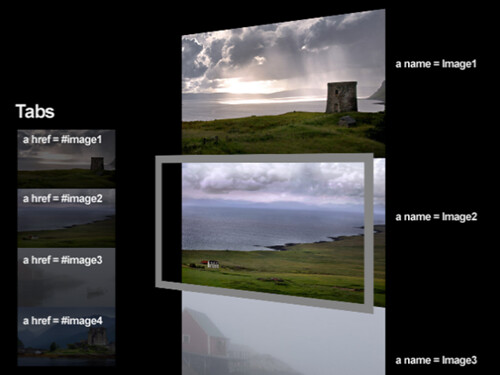
How to Build a CSS Image Viewer the Clever Way
demo
HTML


CSS
/* CSS Reset */
    * {
        margin: 0;
        padding: 0;
        border: 0;
        outline: 0;
    }

    /* Setup Tabs */

    ul{
        background:#000;
        width:125px; /* Width of Tab Image */
        float: left;
        list-style: none;
        border-right:8px solid black;
    }

    ul li{
        height:75px; /* Height of Tab Image */
    }

    /* Setup Tab so normal opacity is 40 and rollover is 100 */
    ul li a img{
        /* for IE */
        -ms-filter:"progid:DXImageTransform.Microsoft.Alpha(Opacity=40)";
        filter:alpha(opacity=40);

        /* CSS3 standard */
        opacity:0.4;

    }

    /* Change Opacity to 100% on roll over */
    ul li a:hover img{

        /* for IE */
        -ms-filter:"progid:DXImageTransform.Microsoft.Alpha(Opacity=100)";
        filter:alpha(opacity=100);

        /* CSS3 standard */
        opacity:1.0;
    }

    /* Places images to the right of the tabs,
    and hides non selected images */
    #images{
        width:500px;
        height:300px;
        overflow:hidden;  /* Hides the non selected images */
        float:left;
    }

    /* Places a black border around the entire viewer
    and centers it on the screen */
    #wrapper{
        width:633px;
        height:300px;
        border:8px solid black;
        margin:0px auto;
    }
效果也蠻不錯的耶!^^
就是簡單囉~
靜態比較省資源^^
對阿~也容易修改^^”